> ## Documentation Index
> Fetch the complete documentation index at: https://densify-sync-changelog-6.mintlify.site/llms.txt
> Use this file to discover all available pages before exploring further.

# Connect Your Kubernetes Clusters

export const InlineImageWithText = ({src, href, children, width = 80, caption}) => {
  return <span className="inline-flex items-center gap-3 align-middle">
            <a href={href} className="inline-block border-b-0">
                <Frame caption={caption}>
                    <img src={src} alt="" className="object-contain align-middle " width={width} style={{
    minWidth: width
  }} />
                </Frame>
            </a>
            <span className="align-middle">{children}</span>
        </span>;
};

## Getting Started

When you first log into Kubex, you'll be presented with a getting started page that walks you through the process of connecting your Kubernetes clusters to Kubex.
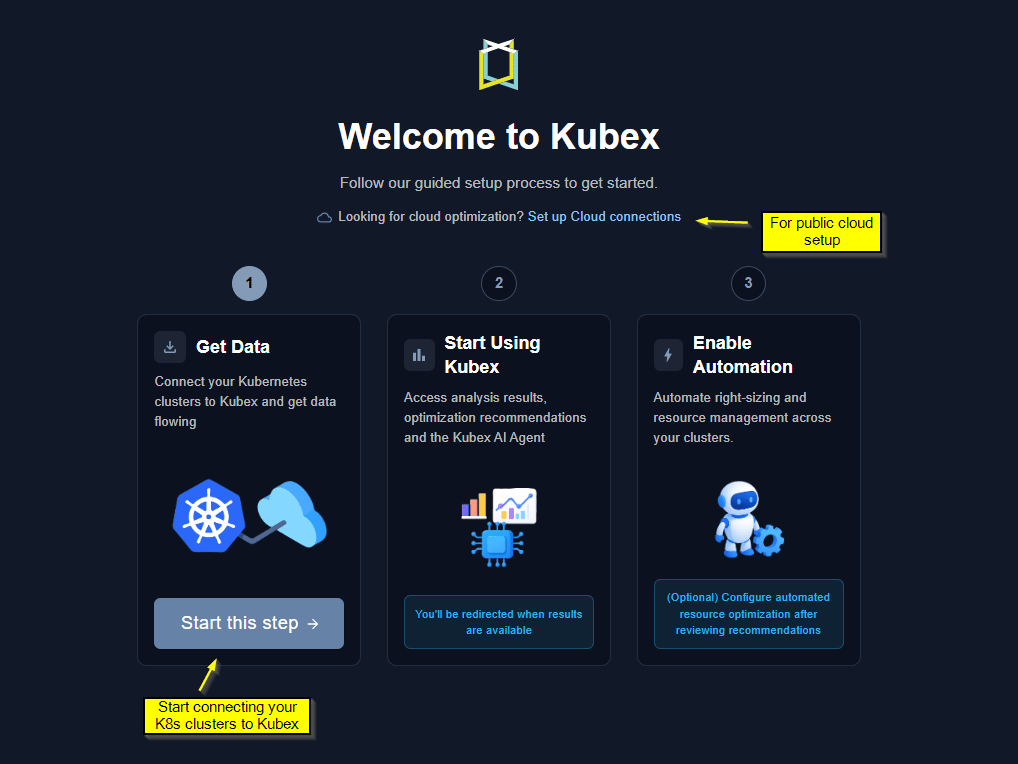
<Frame caption="Figure: Data Collection Status Page">
  <img src="https://mintcdn.com/densify-sync-changelog-6/sL5p2mP7HS4fvbJJ/images/docs-kubex/Content/Kubex/k8s_connection_welcome.png?fit=max&auto=format&n=sL5p2mP7HS4fvbJJ&q=85&s=137d762c0db41c182783ebeab314f251" alt="" width="1018" height="764" data-path="images/docs-kubex/Content/Kubex/k8s_connection_welcome.png" />
</Frame>

<br />

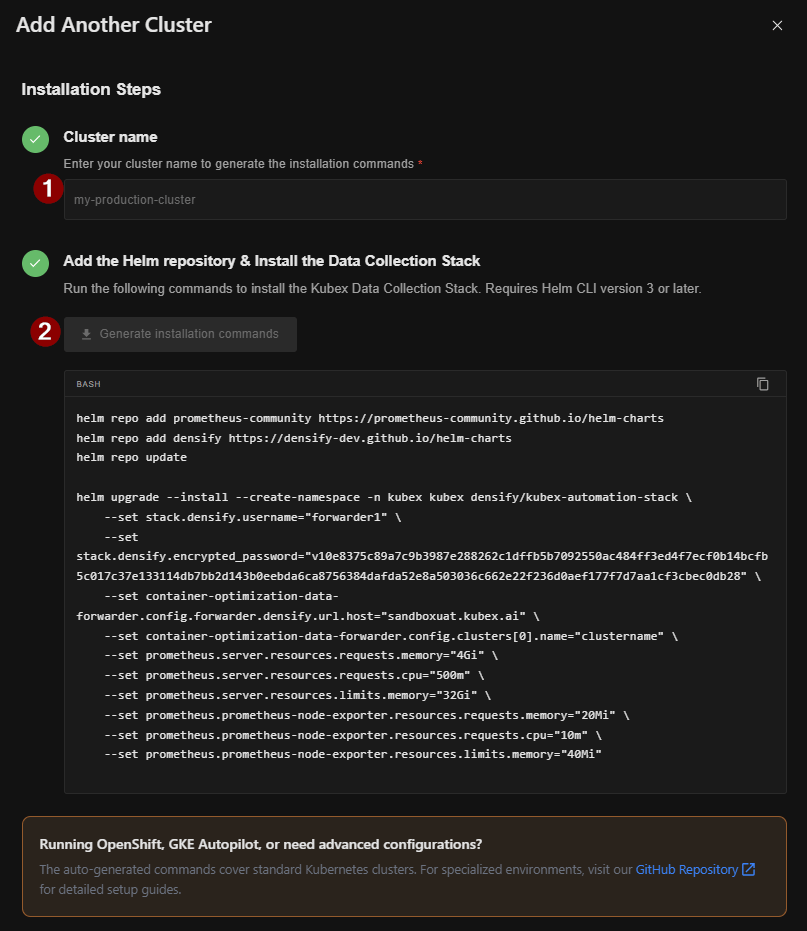
## Helm Commands to deploy the Kubex data collector

Note: Refer to GitHub for <a href="https://github.com/densify-dev/helm-charts/blob/master/charts/kubex-automation-stack/README.md">OpenShift</a> and <a href="https://github.com/densify-dev/helm-charts/blob/master/charts/kubex-collection-gke-autopilot/README.md">GKE Autopilot</a>

<Frame caption="Figure: Data Collection Status Page">
  <img src="https://mintcdn.com/densify-sync-changelog-6/sL5p2mP7HS4fvbJJ/images/docs-kubex/Content/Kubex/k8s_getdata_setup.png?fit=max&auto=format&n=sL5p2mP7HS4fvbJJ&q=85&s=19e0ddb1aaf2322f88910a8299cb2014" alt="" width="807" height="931" data-path="images/docs-kubex/Content/Kubex/k8s_getdata_setup.png" />
</Frame>

<br />

## Data Collection Status & Adding More Clusters

After deploying Kubex data collection, data will begin flowing within an hour. You can monitor the status of each cluster connection through the data collection status page, which is also accessible from the side panel. Kubex performs data analysis overnight, so data flowing in today will show analyzed results the following morning.
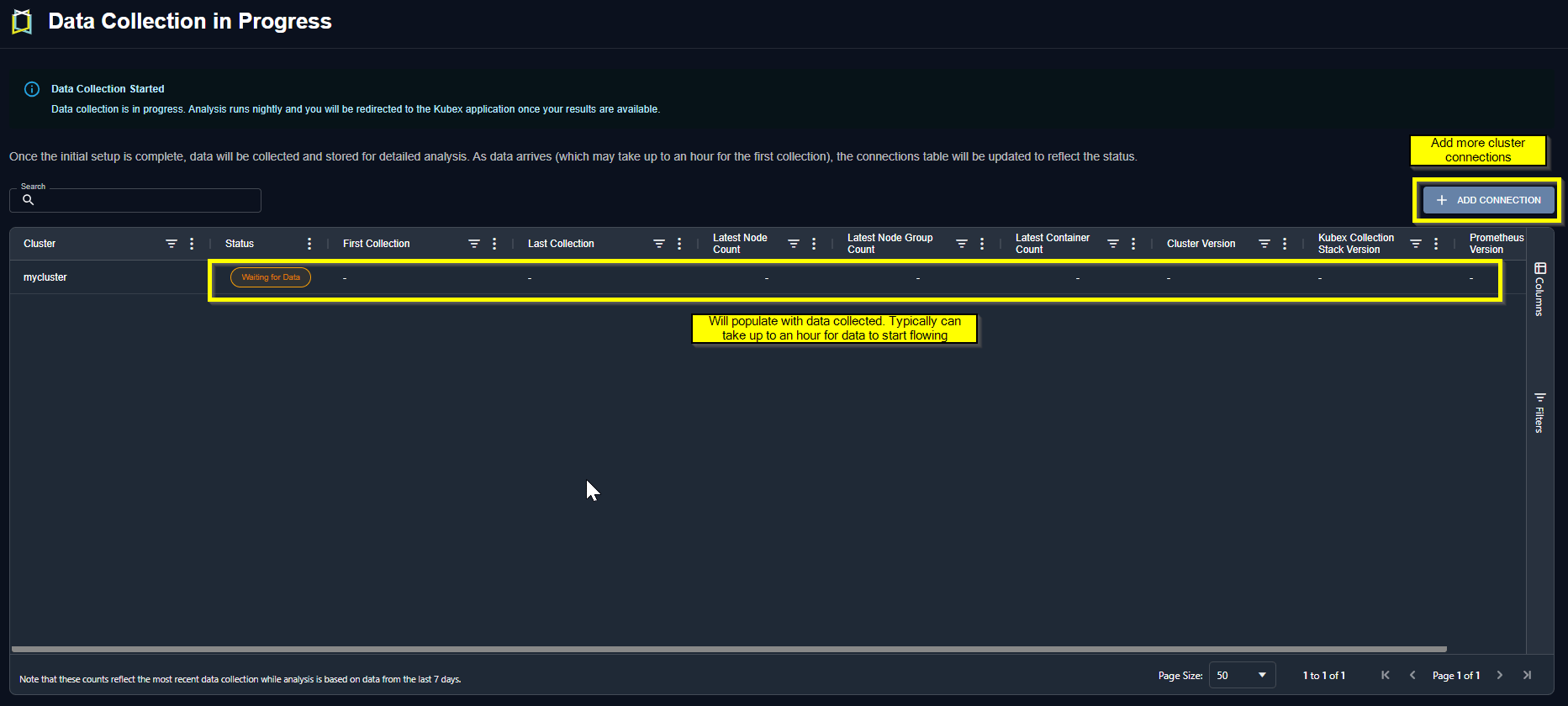
<Frame caption="Figure: Data Collection Status Page">
  <img src="https://mintcdn.com/densify-sync-changelog-6/sL5p2mP7HS4fvbJJ/images/docs-kubex/Content/Kubex/k8s_datastatus.png?fit=max&auto=format&n=sL5p2mP7HS4fvbJJ&q=85&s=5854dd1ea243e88e9370e62f9190ce80" alt="" width="1865" height="840" data-path="images/docs-kubex/Content/Kubex/k8s_datastatus.png" />
</Frame>

<br />

Other configuration options including multi-cluster and observability platforms are also supported. See <a href="/docs-kubex/Content/Kubex/Data_Collection_Alternate_Methods" xrefformat="{u}{paratext}{/u}">Advanced Data Collection for Containers</a> or <a href="https://github.com/densify-dev/container-data-collection">Github</a> for other configuration options.